
Technology
Planning a Reliable HVAC System for Modern Commercial Buildings

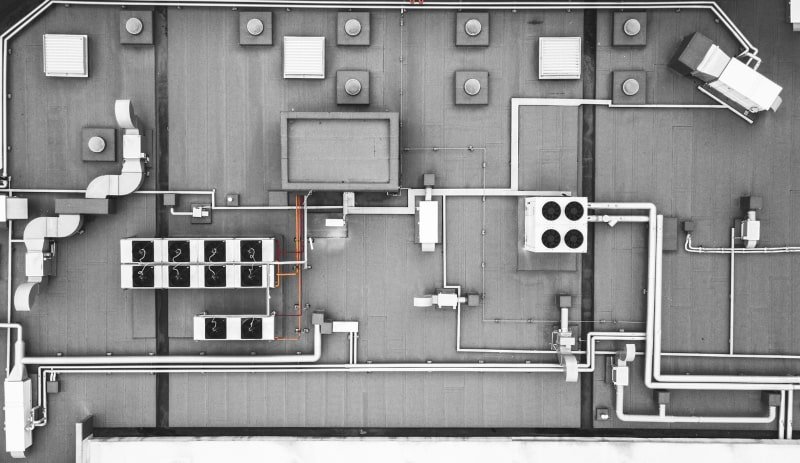
A commercial heating and cooling system is an important part of any building because it influences indoor comfort, air movement, energy use, equipment performance, and the overall working environment. Unlike residential systems that generally serve a smaller area with relatively predictable occupancy, commercial HVAC equipment may need to support large spaces, multiple zones, changing occupancy levels, extended operating schedules, and different temperature requirements at the same time. For this reason, installing a commercial HVAC system requires careful planning rather than simply selecting equipment and placing it inside a building. Proper design, sizing, installation, controls, ventilation, and ongoing maintenance all contribute to how effectively the system performs over time. Property owners and facility managers who understand these factors can make more informed decisions and create an HVAC solution that supports both present requirements and future building needs.
- Understanding Commercial HVAC Requirements
- Importance of Proper System Sizing
- Designing Effective Air Distribution
- Selecting Appropriate Equipment
- The Value of Professional Installation
- Considering Energy Efficiency
- Supporting Indoor Air Quality
- Preparing for Future Maintenance
- Integrating Heating and Cooling Controls
- Preparing the Building Before Installation
- When Replacement and New Installation Differ
- Why Commissioning and Testing Matter
- Planning for Long-Term Performance
- Choosing the Right Installation Partner
- Conclusion
Understanding Commercial HVAC Requirements
Every commercial property has its own heating and cooling requirements, which means an HVAC system should be selected according to the characteristics of the building rather than based only on equipment capacity. Factors such as building size, ceiling height, insulation, windows, occupancy, lighting, equipment loads, operating hours, ventilation requirements, and interior layout can influence the amount of heating and cooling required. A system that is too small may struggle to maintain comfortable temperatures during periods of high demand, while an oversized system may cycle inefficiently and create inconsistent indoor conditions. A professional assessment before installation can help identify the property’s specific requirements and establish a foundation for a properly designed system.The intended use of the building also plays an important role in HVAC planning. An office, retail space, warehouse, restaurant, medical facility, and industrial environment can have very different temperature, ventilation, and airflow requirements. Occupancy patterns can also change throughout the day, creating varying demands across different areas. A well-designed system can account for these differences through appropriate zoning, controls, equipment selection, and air distribution. Taking time to understand these requirements before installation can reduce the likelihood of performance problems later and help ensure that the equipment is appropriate for the building’s actual operating conditions.
Importance of Proper System Sizing
Correct equipment sizing is one of the most important considerations during HVAC installation. Choosing equipment solely according to the size of a building does not necessarily produce the best result because other factors influence heating and cooling loads. A professional evaluation can consider the building envelope, insulation, windows, occupancy, equipment, lighting, ventilation, and other variables that affect indoor temperature. This information helps determine the capacity needed to maintain appropriate conditions without forcing the system to operate inefficiently.An improperly sized system can create several problems. Equipment that lacks sufficient capacity may run for extended periods without adequately conditioning the space, particularly during periods of high demand. On the other hand, equipment with excessive capacity may reach thermostat settings too quickly and cycle on and off more frequently than intended. This can affect comfort, humidity control, energy consumption, and component wear. Proper sizing therefore contributes not only to comfort but also to the long-term operation of the entire HVAC system. Professional planning before installation can help avoid these problems and create a more balanced solution.
Designing Effective Air Distribution
Installing HVAC equipment is only one part of creating a functional climate-control system. The distribution of conditioned air throughout the building is equally important. Ductwork, vents, registers, dampers, fans, and other distribution components must work together to move air effectively into the spaces that require heating or cooling. Poorly planned distribution can result in uneven temperatures, restricted airflow, excessive system operation, and uncomfortable areas within the building.Commercial properties may benefit from zoning strategies that allow different sections of the building to be managed according to their individual needs. Areas with different occupancy schedules or heat loads may not require identical temperature settings throughout the day. Proper zoning and control systems can provide greater flexibility while helping avoid unnecessary conditioning of spaces that are not heavily occupied. During installation, professionals can evaluate the building layout and determine how air distribution can best support the property’s operational requirements.
Selecting Appropriate Equipment
Equipment selection should consider more than the initial purchase price. Commercial HVAC systems represent a significant investment, so property owners should consider expected operating requirements, maintenance needs, efficiency, available space, controls, replacement parts, and long-term service considerations. Different types of systems can provide different advantages depending on the building’s design and intended use. A professional HVAC contractor can help evaluate these factors and explain how different equipment configurations may perform under the property’s specific conditions.The equipment should also be compatible with the existing electrical, structural, ventilation, and mechanical requirements of the building. Installation space must be evaluated carefully because commercial equipment may require adequate clearance for airflow, service access, and safe operation. Outdoor components should also be positioned appropriately to support airflow and provide technicians with reasonable access for future maintenance. Thoughtful equipment placement can make the system easier to service while supporting reliable performance throughout its operating life.
The Value of Professional Installation
The quality of an HVAC installation can significantly influence the performance of the equipment. Even high-quality equipment may fail to deliver expected results when installation is rushed, poorly planned, or performed without adequate attention to system requirements. Professional installation involves more than connecting equipment and turning it on. Technicians need to consider airflow, electrical connections, refrigerant-related components, drainage, controls, ductwork, equipment placement, and other factors that influence system operation.Working with experienced professionals can also help identify installation challenges before they become expensive problems. A building may have structural limitations, limited equipment space, unusual ductwork requirements, or electrical considerations that need to be addressed before work begins. Identifying these conditions during the planning stage allows the installation process to be organized more effectively. Proper preparation can reduce unnecessary delays and help ensure that the completed system operates as intended.
Considering Energy Efficiency
Energy consumption is an important consideration for commercial properties because HVAC systems can represent a significant portion of a building’s operating expenses. Selecting efficient equipment can help reduce unnecessary energy use, but equipment efficiency is only one part of the equation. Proper sizing, ductwork, insulation, controls, maintenance, and building conditions can all influence actual system performance. A highly efficient unit may not deliver its expected benefits if the rest of the system is poorly designed or maintained.Modern control technologies can also provide opportunities to manage energy use more effectively. Programmable thermostats, zoning controls, occupancy-based adjustments, and building management systems can allow heating and cooling operation to respond more closely to actual demand. These technologies may be particularly useful in larger buildings where different areas have different schedules and temperature requirements. During installation, property owners can discuss control options with HVAC professionals and determine which features are practical for their building.
Supporting Indoor Air Quality
A commercial HVAC system should be designed with indoor air quality in mind as well as temperature control. Proper ventilation helps manage indoor air movement, while filtration can assist with reducing airborne particles that circulate through the system. Depending on the property and its use, humidity management and additional air-quality measures may also be important. These considerations can be incorporated into the overall HVAC design instead of being treated as separate concerns after installation.Indoor air quality can influence how occupants experience the building. Stale air, excessive humidity, unpleasant odors, and inconsistent ventilation can create an uncomfortable environment even when temperatures appear acceptable. A properly designed ventilation and filtration strategy can support a more balanced indoor environment. Professional HVAC specialists can assess the building’s needs and recommend suitable approaches based on occupancy, layout, equipment, and operating conditions.
Preparing for Future Maintenance
Maintenance access should be considered before installation begins. HVAC equipment requires periodic inspections, cleaning, adjustments, component checks, and repairs, so technicians need sufficient space to safely access important components. Equipment installed in a difficult-to-reach location may create unnecessary challenges during future service. A well-planned installation considers not only how the system will operate on the first day but also how it will be maintained throughout its service life.Property owners should also keep documentation related to the installation, including equipment information, maintenance requirements, warranties, service records, and relevant system details. These records can make future troubleshooting more efficient because technicians can understand the history of the equipment and identify previous work. Organized documentation is especially valuable when multiple technicians or facility managers become involved over the life of the system.
Integrating Heating and Cooling Controls
Modern commercial buildings can benefit from advanced control systems that allow property managers to monitor and adjust HVAC operation more effectively. Basic thermostatic controls may be suitable for some smaller commercial spaces, while larger properties may require multiple zones and centralized management. Controls can help coordinate temperature settings, operating schedules, airflow, and other system functions according to the needs of different areas.A well-designed control strategy can also help reduce unnecessary operation. For example, spaces that are unoccupied for extended periods may not require the same level of conditioning as areas that are consistently occupied. Automated scheduling and zoning can help align HVAC operation with actual building use. However, controls should be properly configured during installation because incorrect settings can create comfort problems or prevent equipment from operating as intended. Professional commissioning and testing can help verify that controls respond correctly.
Preparing the Building Before Installation
Successful HVAC installation often begins before technicians arrive on site. Property owners and facility managers may need to review access requirements, equipment locations, electrical capacity, structural considerations, and work schedules. If the building is occupied, installation may need to be coordinated around employees, customers, tenants, or other activities. Careful planning can reduce unnecessary interruptions and help the project proceed more efficiently.The installation area should also be evaluated for potential obstacles. Existing equipment, ductwork, wiring, plumbing, structural components, and other building systems may affect the placement of new HVAC equipment. Identifying these factors early gives professionals an opportunity to develop an appropriate installation strategy. In some cases, modifications may be required to accommodate the new system, and understanding those requirements in advance can make budgeting and scheduling more predictable.
When Replacement and New Installation Differ
Installing HVAC equipment in a new commercial building can provide more flexibility because the system can be incorporated into the building design from the beginning. Replacement projects can be more complex because professionals must work around existing structures, ductwork, electrical systems, and other equipment. Both situations require careful planning, but replacement projects often involve additional considerations regarding compatibility and removal of existing equipment.When replacing an older system, property owners can evaluate whether the current configuration still meets the building’s needs. Changes in occupancy, renovations, space usage, or equipment loads may mean that the original HVAC design is no longer appropriate. A replacement project can therefore provide an opportunity to reassess the building and make improvements rather than simply installing new equipment in exactly the same configuration. Professional evaluation can help determine whether modifications to zoning, ductwork, controls, or equipment capacity may be beneficial.
Why Commissioning and Testing Matter
After installation, the system should be thoroughly tested to verify that major components and controls are operating correctly. Commissioning can involve checking airflow, temperature performance, controls, electrical components, drainage, and other aspects of system operation. This process helps identify installation-related problems before the building depends heavily on the equipment during demanding operating conditions.Testing can also provide an opportunity to confirm that the system is responding appropriately to different settings and operating conditions. If certain areas are not receiving adequate airflow or if controls are not communicating correctly, these issues can be investigated before they become routine complaints. A careful final inspection helps ensure that the installation meets the intended design and provides a useful baseline for future maintenance.
Planning for Long-Term Performance
An HVAC installation should be viewed as the beginning of a long-term equipment lifecycle rather than the end of a construction project. Even a properly installed system requires routine care to maintain performance. Filters need appropriate attention, mechanical components should be inspected, electrical connections may require evaluation, and controls should be checked periodically. Regular maintenance can help identify developing issues before they interfere with normal building operations.Long-term planning can also help property owners understand when repairs, upgrades, or eventual replacement may become appropriate. Maintaining service records provides valuable information about equipment performance and repair history. Over time, these records can help identify recurring problems and support more informed decisions. A well-maintained system can provide reliable service for many years, but its performance depends on continued attention after the original installation is complete.
Choosing the Right Installation Partner
Selecting an experienced HVAC professional is an important part of any commercial installation project. Property owners should consider whether the service provider understands commercial system requirements, can evaluate the building appropriately, communicates clearly, and provides support beyond the initial installation. A contractor should be able to explain equipment choices, installation requirements, maintenance considerations, and control options in terms that make sense for the property’s specific needs. Professional support can make the entire process more organized, from initial assessment through equipment selection, commercial hvac installation, testing, and future maintenance. When the same service relationship continues after installation, technicians may also become familiar with the property’s equipment and operating characteristics. This familiarity can be useful when troubleshooting future problems or planning system improvements. The goal should be a complete HVAC solution that supports the building’s needs rather than simply completing an equipment installation.
Conclusion
A properly planned HVAC system can provide an important foundation for commercial building comfort, energy management, indoor air quality, and long-term operational reliability. From evaluating building requirements and calculating appropriate capacity to designing airflow, selecting equipment, installing controls, and planning future maintenance, every stage of the process can influence the final result. Taking shortcuts during planning or installation may create problems that become more difficult and expensive to address later, while a carefully coordinated approach can support dependable performance from the beginning.Professional commercial hvac installation should therefore be approached as a complete building-system project rather than a simple equipment replacement or installation task. Property owners can benefit from evaluating current and future requirements, considering efficiency and maintenance needs, and working with qualified professionals who can address the technical details of the project. With proper planning, installation, testing, and ongoing service, an HVAC system can become a dependable part of the property’s infrastructure while supporting comfortable and productive indoor spaces.Ultimately, successful HVAC planning depends on matching the system to the building and maintaining that system throughout its useful life. Professional evaluation, appropriate equipment selection, quality installation, effective controls, and regular maintenance all contribute to better long-term performance. By giving each of these areas proper attention, commercial property owners can create an HVAC environment that is better prepared to handle changing demands while supporting the comfort and functionality of the building. Reliable commercial hvac installation is an important investment, and thoughtful planning can help ensure that investment continues to provide value well beyond the initial installation.
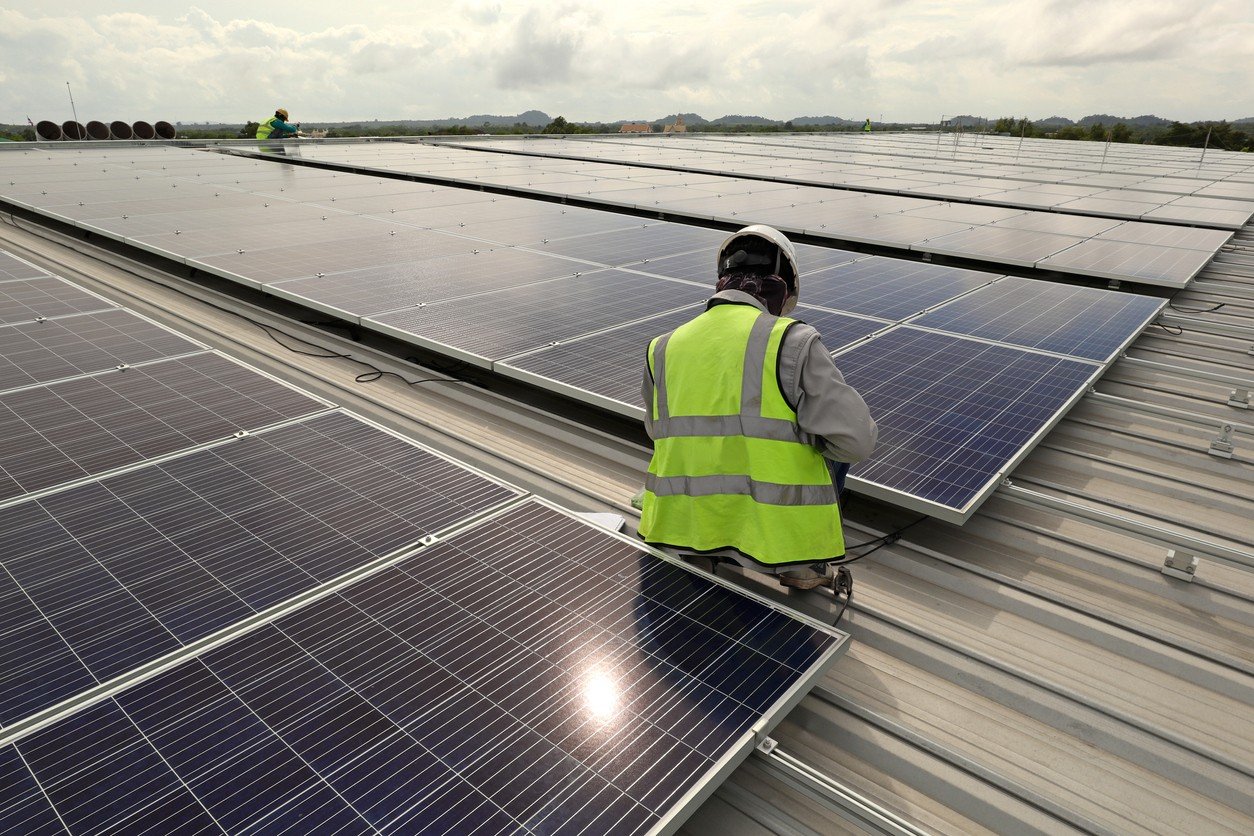
Businesses in Phoenix face significant electricity demands, particularly during the summer when cooling systems operate for extended periods. Solar installation can help commercial property owners manage energy expenses and generate electricity from sunlight. However, choosing the right contractor requires careful research.
- 1. Experience With Commercial Solar Projects
- 2. Detailed Property Assessment
- 3. Equipment Quality and Compatibility
- 4. Licensing, Insurance, and Safety
- 5. Transparent Pricing and Project Scope
- 6. Installation Timeline and Business Operations
- 7. Warranty and After-Installation Support
- Make an Informed Hiring Decision
Before hiring a commercial solar contractor in Phoenix, businesses should evaluate several factors to ensure the proposed installation meets their operational needs.
1. Experience With Commercial Solar Projects
Larger systems and more detailed planning are required for commercial installations than for residential projects. As a result, experience is one of the initial things you should consider.
Inquire with a potential contractor about their commercial experience. Check for experience in offices, warehouses, retail buildings, or industrial facilities that are like yours. This is a way to find out if the contractor is capable of taking on your project and its requirements.
2. Detailed Property Assessment
You should contact a solar professional to assess your property before you install a solar system. This evaluation can be used to assess space available and system capacity.
The contractor needs to check the electricity use, roof surface, orientation to the sun and shade. These factors affect the design of the system as well as the amount of energy to be expected.
Don’t hire a company that offers a generic package without first assessing your property. If you have a good assessment, it will make for a better installation.
3. Equipment Quality and Compatibility
The solar panels and the inverters are important components of the system performance. With quotes from a solar company in Phoenix, ask about equipment recommended by the contractor and why them.
Check out panel specs, inverter characteristics, and manufacturer warranties. Equipment should be designed to meet the energy needs and installation conditions for your property.
In addition, inquire about the interaction of the chosen components. A contractor should clearly communicate technical information, which will help you understand what your business will get.
4. Licensing, Insurance, and Safety
When installing a solar system as a business, safety and compliance should be taken into account because it is electrical work. Check the contractor’s licenses and insurance for the project.
Inquire about the company’s adherence to necessary electrical and building codes. It’s also important to know who will oversee the installation and schedule required inspections.
These checks minimize the risk of potential problems and give peace of mind through the contractor’s professional approach.
5. Transparent Pricing and Project Scope
While price is important, it is dangerous to go for the cheapest quote without checking out the details. Proposals from various contractors can vary in terms of the equipment, the installation services, and project needs they provide.
Ask for a detailed quote, which will include equipment costs, labor, installation, and any other costs. When looking at the total scope of the project, rather than just the final price, compare it.
It’s also important to discuss the terms of payment and the estimated time frame for installation. Documentation is useful to avoid any extra costs and miscommunications.
6. Installation Timeline and Business Operations
Construction often requires business to keep functioning on a daily basis. So discuss the installation schedule before signing an agreement.
Inquire about methods of equipment delivery, equipment installation, and inspection. Having a well-structured plan enables property managers to prepare for temporary interruptions.
The contractor should also discuss with the client how the team will communicate progress and how they will handle unforeseen delays.
7. Warranty and After-Installation Support
Solar systems need quality equipment and installation to operate efficiently. When hiring a contractor, check the manufacturer’s warranties and questions about manufacturer warranties for installation.
In addition, talk about what support is provided once the project is done. Learn how the company deals with equipment problems, system performance problems and repair requests.
After installation, consistent communication can assist businesses in resolving issues before it becomes a hassle.
Make an Informed Hiring Decision
Selecting the right contractor involves balancing experience, system design, equipment quality, safety, pricing, and long-term support. Compare proposals carefully and ask questions before making a commitment. Businesses exploring commercial solar installation in Phoenix and across Arizona can consider Watt Masters when evaluating providers for their commercial solar projects.


To turn your iPad into the perfect binge-watching device, choose the right model and screen size, adjust display and sound settings, download episodes for offline viewing, use a good stand or case, pair quality headphones, manage battery life and set up your apps and profiles. A few simple changes make your iPad a portable cinema for long flights, lazy weekends and late-night marathons.
- 1. Choose the right iPad for watching shows
- 2. Adjust display settings
- 3. Improve the sound
- 4. Download episodes for offline viewing
- 5. Use a good stand or case
- 6. Pair quality headphones
- 7. Manage battery life
- Set up apps and profiles
- Binge-watching habits worth keeping
- Make the most of picture-in-picture and multitasking
- Protect your iPad on the go
- Frequently asked questions
- Which iPad has the best screen for movies?
- How much storage do I need for downloads?
- Can I connect my iPad to a TV?
- Do downloaded episodes expire?
- Are AirPods worth it for watching shows?
- Is an iPad better than a laptop for watching shows?
- How can I reduce eye strain during long viewing sessions?
- Final thoughts
Many people watch more shows on their iPad than on their TV. It is light, has a beautiful screen and goes everywhere with you. Here are seven easy tips to make every episode look and sound its best.
1. Choose the right iPad for watching shows
If you are buying a new iPad mainly for entertainment, screen size and display quality matter most. The standard iPad is great value for casual viewing. The iPad Air offers a brighter, laminated display and more power. The iPad Pro has the best screen, with excellent contrast and brightness for HDR content, while the iPad mini is perfect for watching in bed or on a crowded commute.
If you are comparing models, AppleBitcoin’s iPad range lists the current models with their screen sizes and storage options side by side, which makes it easier to pick the right one for your viewing habits.
2. Adjust display settings
A few display tweaks can improve your viewing experience:
- Turn on True Tone for more natural colours in different lighting.
- Use Night Shift in the evening to reduce blue light.
- Lower auto-brightness in dark rooms to avoid eye strain.
- Turn on Dark Mode so menus do not glare between episodes.
3. Improve the sound
iPad speakers are surprisingly good, but you can make them better. Turn on spatial audio in supported apps for a more immersive experience, and use the sound settings to adjust volume limits. If dialogue is hard to hear, turn on subtitles or enable the “dialogue boost” option available in some streaming apps.
4. Download episodes for offline viewing
Most streaming apps let you download episodes before you travel. Download over Wi-Fi to save mobile data, and choose a higher quality setting if you have enough storage. Check how long downloads stay available, as many apps remove them after a set time. Delete watched episodes regularly to free up space.
5. Use a good stand or case
Holding an iPad for hours is tiring. A folding case, adjustable stand or pillow stand keeps the screen at a comfortable angle on a table, desk or bed. Some cases include keyboards, which are handy if you also use your iPad for work.
6. Pair quality headphones
Wireless headphones or earbuds with noise cancellation are ideal for watching on planes, trains or in shared homes. AirPods switch automatically between your Apple devices and support spatial audio with head tracking for a cinema-like feel.
7. Manage battery life
Video streaming uses a lot of battery. To make it last through a marathon:
- Download episodes instead of streaming when possible.
- Lower screen brightness.
- Close apps you are not using.
- Carry a power bank or a USB-C charger.
Set up apps and profiles
Organise your streaming apps in one folder or on your home screen for quick access. Create separate profiles for family members so recommendations stay relevant, and use Screen Time to manage how much children watch. Turn on Guided Access if you want to lock a child into one app during a long trip.
Binge-watching habits worth keeping
Long viewing sessions are more enjoyable with a few healthy habits. Take short breaks between episodes to stretch and rest your eyes, keep a glass of water nearby and avoid watching right up until you fall asleep. Turning on the autoplay countdown, rather than instant autoplay, gives you a moment to decide whether to keep going.
Make the most of picture-in-picture and multitasking
Your iPad can keep a show playing while you do other things. Picture-in-picture lets you shrink a video into a small window while you chat, browse or check email, and Split View lets you watch in one half of the screen while you scroll social media or follow along with a recap in the other. These features work in most major streaming apps and turn your iPad into a great second screen during live events.
Protect your iPad on the go
If you watch on trains, planes and in cafés, protect your iPad with a sturdy case and a screen protector. Turn on Find My iPad so you can locate it if it is lost, and set a strong passcode. Avoid logging in to streaming accounts on shared or public devices, and sign out of any you no longer use. These small steps keep your account and your device safe wherever you binge.
Frequently asked questions
Which iPad has the best screen for movies?
The iPad Pro has the best display for movies, especially HDR content, but the iPad Air is excellent value.
How much storage do I need for downloads?
128GB is a comfortable minimum if you download shows regularly. Heavy downloaders should consider 256GB or more.
Can I connect my iPad to a TV?
Yes. You can use AirPlay with compatible TVs or an adapter to connect to an HDMI input.
Do downloaded episodes expire?
Many streaming services limit how long downloads stay available, often 48 hours after you start watching. Check each app’s rules.
Are AirPods worth it for watching shows?
Yes, especially models with spatial audio and noise cancellation, which make viewing far more immersive.
Is an iPad better than a laptop for watching shows?
For many people, yes. An iPad is lighter, easier to hold in bed or on a plane and has a long battery life, while a laptop is better if you also need a keyboard for work.
How can I reduce eye strain during long viewing sessions?
Lower the brightness in dark rooms, use Night Shift in the evening and follow the 20-20-20 rule: every 20 minutes, look at something 20 feet away for 20 seconds.
Final thoughts
With the right settings, a comfortable stand and good headphones, your iPad can rival a home cinema. Set it up once, download your favourite shows and enjoy your next binge wherever you are.


Creating one useful image is different from producing several that belong together. With ai image generation, a blog series, social campaign, presentation, or creative story can quickly accumulate pictures with mismatched colors, viewpoints, and levels of detail. A coherent set needs a shared direction and a clear purpose for each image. This guide explains how to plan that direction, generate individual candidates, and refine the collection without making every picture look identical.
- 1. Choose the right iPad for watching shows
- 2. Adjust display settings
- 3. Improve the sound
- 4. Download episodes for offline viewing
- 5. Use a good stand or case
- 6. Pair quality headphones
- 7. Manage battery life
- Set up apps and profiles
- Binge-watching habits worth keeping
- Make the most of picture-in-picture and multitasking
- Protect your iPad on the go
- Frequently asked questions
- Which iPad has the best screen for movies?
- How much storage do I need for downloads?
- Can I connect my iPad to a TV?
- Do downloaded episodes expire?
- Are AirPods worth it for watching shows?
- Is an iPad better than a laptop for watching shows?
- How can I reduce eye strain during long viewing sessions?
- Final thoughts
Define what the project needs before generating images
List the actual deliverables and where they will appear. A blog project might need a feature image and several explanatory illustrations. A social series might need an introduction, examples, and a summary card. A campaign might need a wide banner, portrait announcement, and supporting visuals.
Write the job of each image beside its destination. One may establish the subject; another may clarify a comparison; another may support a practical next step. This prevents a collection of attractive pictures from becoming a project with no clear visual structure.
Decide whether the images will be seen in order or independently. A carousel needs progression between frames. Several article images need to support the relevant sections without necessarily forming a continuous scene. A campaign can share an identity across placements even when viewers encounter only one asset.
Generate according to those needs rather than setting an arbitrary image count. If two images contribute the same information, consider whether the project actually needs both.
Choose a small set of shared visual rules
Identify the choices that should connect the collection: palette, illustration treatment, lighting, viewpoint, background complexity, and the way subjects occupy the frame. Keep the rules concrete enough to use while writing prompts and reviewing candidates.
For example, a research-themed editorial project could use a restrained blue-and-cream palette, simple paper objects, soft overhead light, and an uncluttered desk viewed from above. Those choices establish a recognizable family while allowing different arrangements to explain different ideas.
Separate shared rules from image-specific decisions. The palette might remain stable while object position changes to accommodate a headline. The illustration treatment might stay consistent while the subject changes from cards to folders. Uniformity should not prevent an image from doing its own job.
Avoid relying on a vague phrase such as “same premium style” as the whole specification. Describe the visible qualities you want another person to recognize across the set.
Create a reference image before expanding the collection
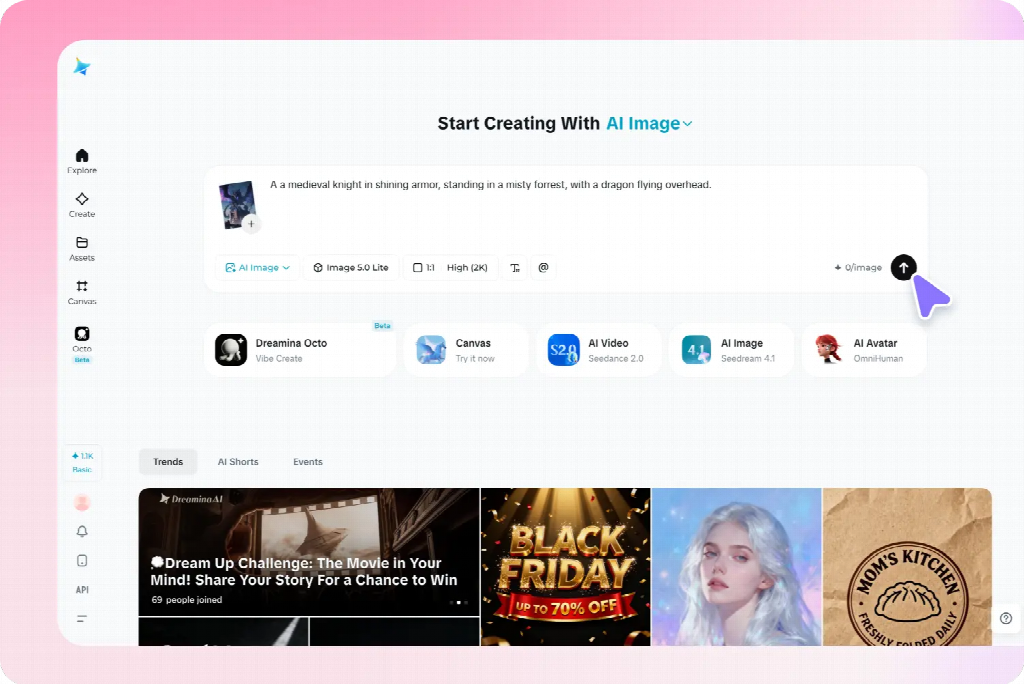
Develop one representative candidate and inspect it inside the actual project layout. Choose a scene that contains enough of the intended treatment to guide later images without being unnecessarily complicated.
In Dreamina, use a written description or supported reference to explore that first image. A proposed brief is: “Original editorial illustration of three groups of plain reference cards beside one closed notebook, overhead view, muted blue and warm cream colors, soft consistent shadows, simple shapes, clear background, no lettering, logos, decorative charts, or extra stationery.”
Review more than its attractiveness. Does the viewpoint support the project? Are the objects readable at the intended size? Does the detail level leave room for the accompanying content? Correct obvious structural problems before treating the image as a reference.
Keep the approved source and a short description of what it establishes. A reference can communicate style, object appearance, or composition, but it does not guarantee that every later result will preserve those features exactly. The prompts here are suggested examples, not reports of tested outputs.
Give each image a separate, focused prompt
Use the shared direction as a stable starting point, then describe the specific subject, relationship, and composition needed for each image. Do not paste the entire project plan into every request.
For a comparison graphic, the brief might specify two clearly separated arrangements of the same paper objects. For a section about selecting information, it might show one card separated from a larger group. For a summary, it might show several groups connected to a central notebook.
Keep each image’s visible state explicit. “Three organized groups” differs from “scattered cards awaiting sorting.” If the prompt describes both conditions without explaining the intended arrangement, the result may blend them into an unclear composition.
Where supported, supply the approved reference and explain its role. Retain the palette and illustration treatment while changing the subject arrangement. Review the output for the requested difference as well as the shared features.
Apply the method to blog and explanatory images
For an article or presentation, begin with the difficult points the visuals need to clarify. A feature image can introduce the broad subject, while supporting pictures explain particular relationships. They can belong to one family without repeating the same composition.
For a planning article, one image might establish the scattered information, another show categories, and a third illustrate a selection decision. Keep comparable objects and viewpoint when they help readers inspect the change. Add exact labels separately when that provides better control.
Do not force an explanatory picture to imitate a feature image’s decorative density. A simpler arrangement may be more useful when the audience needs to compare details. Preserve the shared treatment while allowing the amount of information to match the task.
Use verified source material for precise data, interfaces, real product features, or documented processes. Generated conceptual illustrations can support an explanation without pretending to establish factual evidence.
Adapt the set for social and promotional content
A social series needs a recognizable direction and a distinct contribution from each card. Use a shared palette or motif while changing the image to support the actual message. Avoid producing several near-identical scenes with only a different caption.
For a campaign, distinguish introductory, explanatory, and reminder assets. The introduction may establish the situation; the explanatory visual may need approved product material; the reminder may need a calmer background for practical copy. Their layouts can differ while their treatment remains related.
Preview each image with its real headline or caption. A wide banner’s useful empty region may disappear in a portrait crop. Change the subject position or create a companion composition rather than assuming one source can simply be resized for every placement.
For authentic products, retain accurate source assets and use generated material for appropriate supporting roles. A consistent-looking collection is not successful if it repeatedly alters the item being promoted.
Keep recurring characters and objects recognizable
For creative illustrations, record the features that matter for recognition: a character’s clothing, an object’s silhouette, or a setting’s main landmarks. Use a few clear references rather than expecting perfect repetition of every incidental surface.
A fictional traveler might retain a blue coat and small cream bag across several scenes. The action and setting can change, but the bag should not disappear without a reason. If it changes hands, decide whether the story establishes that change or whether the image needs correction.
A story also needs the right information at the right moment. Do not reveal an outcome in an earlier illustration simply because the full plot was included in the prompt. Brief the current scene rather than asking the generator to summarize the entire narrative.
These continuity checks are one application of the broader method. An explanatory set needs dependable object relationships; a promotional set needs accurate items and a coherent identity. Choose the important constants according to the project.
Review the collection together, not only image by image
Place the candidates side by side in a simple overview, then inspect them in their actual sequence or placements. A picture that looks effective alone may use much stronger contrast or a different viewpoint from the rest.
Compare subject scale, background complexity, lighting, and visual weight. Identify which difference is distracting and which is justified by the task. A summary graphic may need fewer objects; a comparison may need a more structured arrangement.
Then check meaning. Does each picture support its assigned message? Does an accidental change in object size or state suggest information the content never intended? Consistency includes reliable communication, not only matching colors.
Ask a reviewer what connects the set and what they understand from each image. If everything looks related but the individual messages are indistinguishable, increase purposeful variation rather than adding more decorative consistency.
Correct mismatches at the right level
For a small defect in an otherwise suitable candidate, a selected-area correction may preserve the useful composition. Review nearby boundaries and shadows after the change. If the whole treatment differs, a new candidate using the approved direction may be more appropriate.
If a reference-led result repeats the wrong composition, clarify what should change. If the colors drift, restate the limited palette. If the viewpoint varies unintentionally, describe the shared view in concrete terms rather than adding more style adjectives.
Keep exact wording, labels, and required information editable in the finishing layout when that offers better control. Do not regenerate an entire picture solely to correct a date or line break that can be handled reliably as text.
When replacing one image, review the surrounding set again. A correction can improve the individual asset while creating a new mismatch in scale or emphasis. Approve the replacement for its actual role in the collection.
Keep a usable master set for future changes
Store the approved references, shared visual rules, individual prompts, editable layouts, and final exports together. Identify which version belongs to each destination so a rejected candidate is not reused because it has an attractive thumbnail.
For an ongoing series, add a short note explaining the job of each image and what should remain stable. A new contributor can then create another relevant asset without copying the previous picture or inventing an unrelated direction.
Check final crops and text at the actual viewing size before distribution. Fine details can disappear, and a new caption can change the interpretation of an otherwise familiar image. Reuse the visual reasoning, not just the file.
A strong set combines recognizable shared choices with meaningful differences. Planning both allows AI generation to support a coherent project, with each image contributing something specific instead of merely increasing the number of assets.

Renting a Stylish Coupe in Dubai: What Actually Matters

How to Tell Real Korean Toxin Brands From Copycat Vials Before You Buy

A Practical Guide to Fortnite Accounts and V-Bucks

Alex Pettyfer Net Worth, Wife, Age, Height, Children, Career and More

Brad Williams Net Worth, Wife, Height, Age, Daughter, Family, Career and More

Eldorado.gg Review 2026: How It Works, Safety, Fees, and Risks
-
Celebrity11 months ago
Alex Pettyfer Net Worth, Wife, Age, Height, Children, Career and More
-
Celebrity11 months ago
Brad Williams Net Worth, Wife, Height, Age, Daughter, Family, Career and More
-
Blog2 months ago
Eldorado.gg Review 2026: How It Works, Safety, Fees, and Risks
-
 Anime12 months ago
Sanzoku Bandits of One Piece: Origins, Higuma, and Their Role in Dawn Island
-
 Celebrity11 months ago
John McGinn Net Worth, Age, Height, Wife, Childrens, Career and More
-
 Celebrity11 months ago
Frances de la Tour Net Worth, Age, Height, Husband, Childrens, Career and More
-
 Celebrity11 months ago
Will Trickett Net Worth, Wife, Childrens, Age, Career and More
-
 Blog3 months ago
Crackstube: A Complete Guide to the Digital Publishing Platform