
Blog
Winnoise: The Story Behind the 2004 Windows Sound Remix


Winnoise is a short electronic composition made from standard Windows sounds. It uses audio cues that many computer users heard each day. These include tones linked with alerts, startup actions, warnings, and other system events.
- When Did the Project Appear?
- Who Created the Audio Piece?
- Which Windows Sounds Were Used?
- How Was Winnoise Made?
- Why Did the Sound Recorder Matter?
- How Did the Flash Animation Fit In?
- Why Did Winnoise Get Attention Online?
- Is It Music, Digital Art, or a Software Experiment?
- What Makes the Project Different From a Normal Remix?
- How Is the Project Viewed Today?
- Conclusion
The piece does not treat those noises as simple effects. It cuts them into small parts. It changes their pitch and form. It then places them into loops so they work like drums, notes, and rhythm parts.
This is why the project is often described as both music and a software experiment. It takes sounds made for a practical task and gives them a new role.
When Did the Project Appear?
The project circulated online in April 2004. That timing matters because the web looked very different then. Flash pages were common, broadband was still growing, and many creative projects spread through forums, blogs, and file mirrors.
Newgrounds records the official “Windows Noises” upload on April 18, 2004. The page also shows that it placed fourth in the site’s weekly ranking on April 21. A separate SoundClick entry by clownstaples lists an April 13 upload for a track called “winnoise.”
These dates show that the work was shared across more than one platform during the same period.
Who Created the Audio Piece?
The Newgrounds page credits the creator as clownstaples. That page calls its version the official upload. It describes the work in simple terms as a song made from default Windows noises.
Public records linked to the project focus more on the track than on the person behind the username. Because of that, it is best to avoid adding personal details that are not confirmed.
The creator’s main achievement is clear from the surviving pages. A set of common computer sounds was turned into a complete musical sequence with very limited tools.
Which Windows Sounds Were Used?
Reports about Winnoise often mention four main sound sources: ding, chord, chimes, and the Microsoft sound. These were familiar audio files on older Windows systems.
Each sound was short. On its own, it was not made for music. The creator changed that by editing the clips, repeating parts, and placing them into patterns.
The result works because the source material is easy to recognize. A listener may know a tone before they know where they heard it. That memory gives the track a strong link to old desktop computing.
How Was Winnoise Made?
A key part of the process was SNDREC32.EXE, the old Windows Sound Recorder. Neural described the project as using standard resources found on Windows 95 and Windows 98 machines.
The production method was basic by modern standards. Small clips were distorted inside Sound Recorder. Those clips were then mixed into one timed audio file. Repetition helped form the beat.
Neatorama later explained that the soundtrack was built in Sound Recorder, while the finished animation needed another tool. The audio was imported into Macromedia Flash, where the visual side was added.
Was it really made with only Sound Recorder?
The soundtrack appears to have been made with Sound Recorder. The visual presentation was not. Flash was used for the animation that showed the process on screen.
That distinction is useful. It keeps the claim accurate without reducing the technical interest of the project.
Why Did the Sound Recorder Matter?
SNDREC32.EXE was a very small utility. It was not designed as a full digital audio workstation. It offered simple recording and editing functions.
Using such a limited tool shaped Winnoise. The creator had fewer controls than a modern producer would have. That meant the track depended on simple edits, careful timing, repeated clips, and creative use of distortion.
This limitation is part of the appeal. The piece shows that an ordinary utility can become a creative tool when someone uses it outside its normal purpose.
How Did the Flash Animation Fit In?
The Flash version made the idea easier to understand. It did not only play a song. It also showed the editing process in a visual form.
Neural described the work as a composition illustrated in real time. The animation helped viewers see how standard Windows resources could be turned into a track.
This made Winnoise more than a normal audio upload. It worked as a small demonstration. People could watch the system tools and sounds become part of the composition.
Why was Flash useful for this kind of project?
Flash was widely used for short animations, web cartoons, games, and music experiments in the early 2000s. It let creators combine sound and motion in a single browser based file.
That format matched the project well. The viewer could hear the remix while also seeing the idea behind it.
Why Did Winnoise Get Attention Online?
The piece used sounds that millions of people already knew. That gave it an instant point of reference. People did not need music training to understand the joke or the concept.
It also arrived during a period when remix culture was growing online. Users were sharing strange edits, Flash clips, sample based tracks, and small software experiments through forums and community sites.
Coverage from 2004 and later posts shows that the work kept being shared after its first release. Network World wrote about it in 2006, while Neatorama highlighted it again in 2007.
Is It Music, Digital Art, or a Software Experiment?
Winnoise can fit all three labels. It has rhythm and structure, so it works as music. It also changes the meaning of common interface sounds, which gives it a digital art angle.
At the same time, its method is based on testing the limits of built in software. That makes it feel like a small technical experiment.
There is no need to force the project into one category. Its value comes from the mix. It sits between electronic music, web animation, and playful software use.
What Makes the Project Different From a Normal Remix?
A normal remix often begins with a finished song. This project starts with system sounds that were never meant to form a song.
That changes the process. The creator had to build rhythm, texture, and musical movement from very short source clips. The material had little musical range at the start.
Winnoise also draws on interface memory. The sounds carry a link to old computers, error boxes, startup actions, and daily desktop use. That gives the track a cultural layer beyond the beat itself.
How Is the Project Viewed Today?
The work now functions as a small record of early 2000s internet creativity. The tools, sound files, and Flash format all belong to an older stage of personal computing.
Modern music software can perform far more complex edits with less effort. Yet that does not remove the point of the project. Its interest comes from doing more with less.
The Newgrounds page still identifies the 2004 upload, while other archives and articles preserve the story of how the piece was built. That continued presence helps explain why people still search for it.
Conclusion
Winnoise is best understood as a creative Windows sound experiment from 2004. It used familiar system tones, the basic Sound Recorder utility, and a Flash presentation to turn routine computer audio into an electronic composition.
Its history is modest but well documented. The project did not need advanced studio gear to make its point. It showed how simple software, repeated sounds, and careful editing could create something new.
For people interested in old Windows culture, Flash era web art, or early online remix projects, it remains a useful example of how digital limits can shape creative work.


If you’re thinking about veneers, you’re probably not chasing a “perfect” smile as much as a cleaner, more balanced one that feels like you. That’s a smart place to start. In a coastal area like Marina del Rey, where professional, social, and visual impressions often overlap, cosmetic dentistry tends to be part aesthetics and part strategy. Before you commit, it helps to understand how veneers work, who they suit, and what daily life with them actually looks like.
- Why porcelain remains the standard for long-term aesthetics
- What veneers actually change and what they don’t
- The consultation matters more than most people expect
- A natural-looking result depends on restraint
- Daily life with veneers is easier than you think, but not maintenance-free
- Cost, value, and the tradeoffs behind the price
- How to decide if veneers are the right move for you
Why porcelain remains the standard for long-term aesthetics
Porcelain stays popular for good reasons. It reflects light in a way that looks more like natural enamel, which matters if you want your smile to look believable up close, not just bright in photos. It also resists staining better than composite, which is helpful if coffee, tea, red wine, or pigmented foods are part of your routine.
If you’re looking for porcelain veneers Marina del Rey has local dental practices like Yeo Dental that offer customized veneer treatments to improve the appearance of your smile.
In real terms, you’re often paying for color stability, durability, and a more refined finish.
Composite veneers can still make sense for some cases, especially when you want a less expensive or more conservative option. Still, porcelain usually wins on longevity and surface texture. A smoother, more enamel-like finish tends to age better and collect less visible discoloration over time.
What veneers actually change and what they don’t
Veneers are thin shells, usually made from porcelain, bonded to the front surface of your teeth. They’re designed to improve color, shape, size, spacing, and overall symmetry. If your teeth are healthy but chipped, uneven, worn down, or deeply stained, veneers can create a polished result that whitening or orthodontics alone may not deliver.
They don’t fix every dental issue. If you have active gum disease, untreated decay, major bite problems, or weak enamel, those problems usually need treatment first. Veneers are a cosmetic restoration, not a shortcut around oral health.
The best outcomes happen when you treat them like a precision treatment plan, not a beauty add-on. A dentist evaluates occlusion, enamel quality, soft tissue health, and smile line before anyone talks about shade charts or final shape.
The consultation matters more than most people expect
A veneer case can look amazing or artificial based on decisions made before treatment even starts. The consultation is where those decisions happen. Your dentist should assess facial proportions, lip movement, gum display, tooth show at rest, bite mechanics, and how much tooth structure needs preparation.
You should also expect a conversation about your goals in plain language. Do you want a subtle upgrade? Do you want to close gaps? Are you trying to soften sharp edges, lengthen worn teeth, or brighten a smile that whitening couldn’t lift? Those are different cases with different design choices.
Photos, digital imaging, mock-ups, and temporary restorations can help you preview the result. That preview stage has real value. It gives you a chance to react to shape and size before the final veneers are fabricated, which cuts down the risk of ending up with a smile that feels technically nice but personally off.
A natural-looking result depends on restraint
The most convincing veneers rarely announce themselves. They look proportionate to your face, age, skin tone, and natural dental anatomy. A common mistake is assuming whiter automatically means better. Extremely opaque or oversized veneers can flatten your features and make your smile look disconnected from the rest of you.
Good cosmetic dentistry usually includes tiny irregularities that mimic real teeth: slight translucency near the edges, subtle contour differences, and shade layering instead of one block of uniform white. Those details matter more than people realize.
If you bring inspiration photos, use them to show general preferences, not to request someone else’s exact smile. Your bone structure, lip posture, gingival architecture, and existing dentition create different design limits. A skilled dentist builds around those realities instead of forcing a template that looked good on another face.
Daily life with veneers is easier than you think, but not maintenance-free
Once veneers are bonded, they don’t usually require a complicated routine. You still brush twice a day, floss daily, and keep up with professional cleanings and exams. The difference is that maintenance becomes more about protecting the margins, surrounding gum tissue, and the teeth underneath.
You’ll want to avoid using your teeth like tools. Opening packages, chewing ice, biting pen caps, and cracking hard foods with the front teeth can put stress on veneers and natural enamel alike. If you grind or clench at night, a custom night guard may be part of the plan.
It also helps to know that veneers won’t be immortal. They can last many years, often well over a decade, but replacement eventually becomes part of the long-term picture. Cement integrity, bite changes, wear, and gum recession can all influence timing.
Cost, value, and the tradeoffs behind the price
Veneers can be expensive, and the fee often reflects more than the final material. You’re paying for diagnosis, smile design, tooth preparation, provisional work, lab craftsmanship, bonding protocol, and follow-up care. A high-end lab can make a major difference in shade blending, translucency, and fit.
If a price seems dramatically lower than average, look closely at what may be missing. It could mean rushed planning, lower-grade materials, or a one-size-fits-all design approach. Those shortcuts may not show immediately, but they often appear later as bulkiness, gum irritation, bite discomfort, or a smile that photographs better than it functions.
Value comes from fit, comfort, realism, and longevity. You’re not just buying a cosmetic upgrade. You’re investing in a restoration that sits in one of the most visible and functional parts of your body every single day.
How to decide if veneers are the right move for you
The best candidates usually have healthy teeth and gums, realistic expectations, and a clear reason for wanting change. If your concerns center on shape, moderate spacing, wear, discoloration that won’t respond to whitening, or old restorations that no longer match, veneers may be a strong option.
If your issue is mostly alignment, orthodontics might make more sense first. If the problem is minor edge repair, bonding could be enough. If you’re trying to copy a trend rather than solve a real concern, pause before committing.
A good decision feels specific. You know what bothers you, you understand the prep involved, and you’ve seen a treatment plan that respects your natural features. That approach usually leads to the kind of result people notice without knowing exactly what changed. For most patients, that’s the sweet spot: a smile that looks refreshed, functions well, and still feels like yours.

Wanting a more defined jawline is often about balance, not dramatic change. Before considering injections, learn what filler can improve, how treatment is planned, and which risks matter. The American Society of Plastic Surgeons recorded more than 5.3 million hyaluronic acid filler procedures in the United States in 2024, although that figure is not specific to jawline injections. For people exploring options in Spring Hill, popularity should never replace careful assessment.
What Jawline Filler Can—and Cannot—Change
Jawline filler is a nonsurgical injectable treatment that adds volume along the lower face to create definition. It may sharpen the jaw’s edge, improve mild asymmetry, or smooth the transition between chin and jaw. It does not change bone structure, remove fat, or tighten significant loose skin.
Many contouring fillers contain hyaluronic acid, which attracts water and can be broken down with an enzyme in appropriate circumstances. Other products may not be reversible in the same way. Ask which product is proposed and why it suits your anatomy.
Natural-looking results depend on proportion. Too much volume can make the lower face look heavy, while ignoring the chin, cheeks, and neck can exaggerate imbalance.
Why the Right Plan Matters More Than Trends
Video calls, selfies, and social media can draw attention to details you previously barely noticed. Yet one photograph rarely shows how your face looks in motion, from different angles, or in ordinary lighting.
Identify the specific change you want. Is your jawline unclear because of facial structure, skin laxity, fullness beneath the chin, or a combination? These concerns do not all respond to filler. A qualified clinician should explain whether injections are likely to help and discuss alternatives.
If you are considering jawline filler in Spring Hill, compare providers by their assessment process, product knowledge, and safety practices—not just striking before-and-after images. Ask how the proposed treatment would suit your facial proportions and what result would be realistic for you.
Who May Be a Suitable Candidate?
Filler may suit adults seeking modest definition or correction of mild contour differences, provided their health history and anatomy make treatment appropriate. Skin elasticity, facial volume, jaw shape, and tissue beneath the chin affect what injections can achieve.
Filler may be less useful for significant skin laxity, pronounced fat beneath the chin, or structural concerns it cannot correct. Adding volume to an already full lower face may create bulk rather than definition. A clinician may recommend another approach or advise against treatment.
Be cautious of anyone promising a particular jawline regardless of your starting point. Good aesthetic care includes explaining limitations, not simply agreeing to a requested look.
What a Thorough Consultation Should Cover
A responsible consultation covers your medical history, allergies, previous filler treatments, medicines, and goals. The provider should assess your face from several angles, then explain the product, placement plan, amount, cost, duration, and possible side effects.
Ask who will inject you and what training they have in facial anatomy and complication management. Confirm the product is approved for its intended use in your jurisdiction and comes from a legitimate source. Ask what happens if you dislike the result or develop a complication. Disclose previous facial procedures, medical conditions, and any history of severe allergic reactions to your provider before treatment.
Also ask whether jawline use is an approved indication for the specific filler in your country; approvals differ by product and location. Request aftercare instructions and an emergency contact. If you have a dental procedure, infection, or skin inflammation, disclose it and ask whether treatment should be postponed.
Before-and-after photos can help you understand a provider’s style, but look for consistent results across different faces and angles. Lighting, expression, camera position, and editing can all change how a jawline appears.
What Treatment and Recovery May Feel Like
During treatment, the skin is cleaned, and injection points may be marked. A numbing product or filler containing lidocaine may reduce discomfort. You may feel pressure, pinching, or tenderness. For more context, read Cleveland Clinic’s jawline filler guide.
Swelling, redness, bruising, and tenderness can occur afterward. The area may initially look fuller, so avoid judging the result while swelling remains. Follow instructions about exercise, alcohol, touching the area, and other aftercare precautions.
Allow swelling to settle before assessing the result. Contact your provider if symptoms worsen or do not improve as expected.
How Long Results Last
Jawline filler is temporary, and its duration varies. Product type, amount, metabolism, movement, and treatment area all affect how long results last. Your provider should give a realistic estimate for the specific product rather than promise a fixed lifespan.
Maintenance may be an option, but repeated treatment should not become automatic. Reassess your result and goals before adding product. Chasing an increasingly sharp jawline can create excess volume and disrupt facial balance. Consider the long-term cost, not just the first appointment.
Recognize the Risks and Red Flags
Filler carries risks even when administered by an experienced professional. Common effects include swelling, bruising, redness, and tenderness. Complications can include infection, lumps, asymmetry, migration, and inflammatory reactions.
For details on filler side effects, read the FDA’s overview of dermal fillers. Rarely, filler can enter a blood vessel and reduce blood supply, causing tissue damage or threatening vision. Seek urgent medical attention for severe pain, pale or dusky skin, vision changes, or other sudden symptoms after injection.
Do not choose an injector on price alone. Be wary of pressure to book immediately, vague product information, unclear credentials, or claims that complications never happen. Ask how emergencies are managed and whom to contact afterward.
Decide Based on Your Own Goals
Jawline filler may suit you if you want measured improvement and understand its limits, temporary nature, cost, and risks. It is less likely to satisfy if you expect injections to change bone structure, remove substantial fat, or recreate a filtered image in every setting.
Take time to decide. Consider whether your goal extends beyond a passing reaction to a photograph, and make sure you feel free to decline treatment. The best result is a balanced appearance achieved through informed choice, realistic expectations, and care that puts safety first.
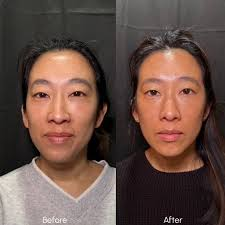
Skin can gradually lose firmness as collagen and elastin change with age. You might notice softer jawline definition, fine lines, or loose-looking skin around the cheeks and neck. These changes are natural, but they can leave some people looking for ways to support a firmer, smoother appearance without surgery.
XERF is a non-invasive skin-tightening treatment designed to address these concerns using radiofrequency energy. Whether it is suitable for you depends on your skin condition, treatment goals, and individual needs.
For those exploring skin tightening in Phoenix, understanding available non-surgical options can help them make informed decisions.
Why Does Skin Begin to Sag?
Collagen gives structure, and elastin allows the skin to stretch and spring back to its normal shape. These proteins undergo changes in their production and organization in the body over time. Other factors such as sun exposure, genetics, and natural aging can also affect the appearance of the skin.
This can cause the skin to feel less firm and cause fine lines to become more visible. While skincare and sun protection are still relevant, they may not be as effective for issues relating to deeper layers of the skin.
How Does XERF Treatment Work?
XERF focuses the radiofrequency energy on specific areas of skin tissue. This is designed to aid collagen remodelling and enhance skin firmness over time.
XERF is a procedure that does not require an incision, unlike surgery. But not all non-invasive is risk-free and outcomes differ. A consultation will be useful to determine if the treatment is going to be what you are looking for and if another treatment might work better.
Those interested in XERF treatment in Phoenix can consult an experienced provider to understand the treatment process and suitability.
Who May Benefit From XERF Skin Tightening?
If you are experiencing mild to moderate skin laxity, an under-delineated jawline, fine lines or loss of firmness in the neck, you might consider XERF. It’s made for individuals wanting to boost firmness without any surgical intervention.
Remember that non-surgical treatments can’t duplicate all of the outcomes of surgery. Improvement will vary based on skin laxity, age, and individual responses. It is best to get professional advice as to whether XERF is right for you.
What Is the Treatment Experience Like?
In a consultation with a provider, discuss your concerns, review areas you want to work on, and review what you can expect and any limitations. XERF is based on radiofrequency energy, and treatment settings can be optimized based on the treatment plan.
A few people feel warm, red or tender following treatment. While there is not a lot of downtime to expect, there may be variations in recovery experiences. Please adhere to your provider’s instructions and discuss any possible risks.
Finding Skin Tightening in Phoenix
When researching skin tightening services, consider the provider’s qualifications, experience with radiofrequency technology, and approach to personalized care. Ask when results may become noticeable, whether additional sessions are recommended, and how long improvements might last.
If you are considering XERF treatment in Phoenix, choose a provider who explains the procedure clearly and sets realistic expectations rather than promising dramatic results. A thoughtful consultation can help you compare options and decide on an approach that suits your skin and aesthetic goals.
For those exploring physician-led skin tightening and personalized aesthetic care in Phoenix, Reid MD Aesthetics offers XERF consultations to discuss skin concerns, treatment suitability, and potential outcomes.
Disclaimer: This article is for general informational purposes only and does not constitute medical advice, diagnosis, or treatment. XERF may not be suitable for everyone, and results and risks vary by individual. Consult a qualified healthcare professional to determine whether this treatment is appropriate for your skin concerns.

Perfume Packaging Guide: Choosing the Right Box for Bottle Size, Protection, and Brand Image

Veneers in Real Life: What You Should Know Before You Change Your Smile

What Most People Get Wrong About Preventive Dental Care

Alex Pettyfer Net Worth, Wife, Age, Height, Children, Career and More

Brad Williams Net Worth, Wife, Height, Age, Daughter, Family, Career and More

Eldorado.gg Review 2026: How It Works, Safety, Fees, and Risks
-
Celebrity10 months ago
Alex Pettyfer Net Worth, Wife, Age, Height, Children, Career and More
-
Celebrity11 months ago
Brad Williams Net Worth, Wife, Height, Age, Daughter, Family, Career and More
-
Blog2 months ago
Eldorado.gg Review 2026: How It Works, Safety, Fees, and Risks
-
 Anime11 months ago
Sanzoku Bandits of One Piece: Origins, Higuma, and Their Role in Dawn Island
-
 Celebrity11 months ago
John McGinn Net Worth, Age, Height, Wife, Childrens, Career and More
-
 Celebrity11 months ago
Frances de la Tour Net Worth, Age, Height, Husband, Childrens, Career and More
-
 Celebrity11 months ago
Will Trickett Net Worth, Wife, Childrens, Age, Career and More
-
 Blog2 months ago
Crackstube: A Complete Guide to the Digital Publishing Platform