
Technology
Nano Banana vs Playground AI: Which Model Is Better for Daily Content Creation?


Daily content creation moves fast now. Creators are no longer making one polished graphic every few days. Most marketers, freelancers, agencies, and social media creators produce content continuously across Instagram, TikTok, YouTube, LinkedIn, Pinterest, and ad platforms at the same time. That shift changed what people expect from AI image tools.
- What Does the Quick Comparison Look Like?
- Why Has Daily Content Creation Changed So Much?
- Why Did Playground AI Become Popular?
- Where Does Playground AI Feel Limited?
- Why Is Nano Banana Getting More Attention?
- Which Platform Feels Faster for Daily Workflows?
- Which Platform Creates Better Visual Quality?
- Which Workflow Feels Easier for Beginners?
- Which Platform Works Better for Branding Campaigns?
- What Does the Pricing Comparison Look Like?
- Which Platform Supports Long-Term Creative Growth Better?
- Which Tool Should You Choose?
- What Is the Final Verdict?
The best platform is no longer just the one with the most impressive image quality. Creators now care about workflow speed, editing flexibility, visual consistency, and how quickly content can move from idea to publish-ready output.
That is exactly why creators have started comparing Playground AI and nano banana more seriously. Both platforms support AI-powered visual creation, but they solve different problems. Playground AI focuses heavily on fast editing, remixing, and quick social media workflows, while Nano Banana inside Higgsfield leans more toward cinematic visuals, polished compositions, and branding-focused outputs.
After reviewing creator discussions, workflow reviews, and real usage comparisons, the difference becomes very clear. Playground AI feels more practical for rapid everyday editing, while Nano Banana focuses more on visually premium creative output.
What Does the Quick Comparison Look Like?
| Feature | Nano Banana | Playground AI |
| Best For | Cinematic branding visuals | Fast social media workflows |
| Main Strength | Premium visual quality | Quick editing and remixing |
| Workflow Style | Cinematic generation workflow | Flexible editing workflow |
| Best Use Cases | Campaigns, ads, branding | Daily content creation |
| Ease of Use | Moderate learning curve | Beginner-friendly |
| Output Style | Polished and cinematic | Clean and practical |
| Editing Flexibility | Moderate | Strong editing workflow |
Why Has Daily Content Creation Changed So Much?
Content production used to focus mostly on quality alone.
Now creators balance quality with speed constantly. A social media manager may need ten graphics before lunch, thumbnail concepts in the afternoon, and promotional visuals before the end of the day. That workload changed how creators evaluate AI image tools.
A visually impressive platform may still fail during daily workflows if the editing process feels slow or repetitive. Creators now need tools that help them move quickly without making content look generic.
That is where the difference between Playground AI and Nano Banana becomes much more noticeable.
Why Did Playground AI Become Popular?
Playground AI gained attention because it made image editing feel fast and approachable.
The platform focuses heavily on practical workflows instead of cinematic presentation. Users can generate visuals, remix images, erase elements, expand scenes, and edit compositions quickly without spending too much time refining prompts.
That flexibility made Playground AI especially useful for creators producing large amounts of social media content daily. The workflow feels lightweight and fast.
Instead of trying to create highly polished campaign visuals every time, Playground AI focuses more on helping creators generate usable content quickly. That simplicity became one of the platform’s biggest strengths.
Where Does Playground AI Perform Well?
Playground AI works especially well for social graphics, quick promotional visuals, meme content, thumbnails, fast ad creatives, content repurposing, and casual marketing workflows.
The editing tools feel very accessible even for beginners. Many creators also prefer Playground AI because they can quickly modify visuals instead of constantly regenerating entire scenes from scratch.
For daily posting schedules, that speed matters a lot.
Where Does Playground AI Feel Limited?
The biggest weakness appears during premium branding projects. While Playground AI creates usable visuals quickly, many outputs still feel more functional than visually cinematic. The platform prioritizes speed and flexibility more than polished presentation quality.
That difference becomes noticeable during luxury branding campaigns, fashion advertisements, premium social campaigns, cinematic promotional visuals, and high-end product marketing.
For creators building visually distinctive branding, the outputs can sometimes feel flatter or more template-driven over time.
Why Is Nano Banana Getting More Attention?
Nano Banana inside Higgsfield gained attention for almost the opposite reason. Instead of focusing mainly on fast editing workflows, the platform emphasizes cinematic presentation, stronger composition quality, and visually polished outputs.
Many creators testing Higgsfield noticed that the generated visuals already looked closer to professionally art-directed campaign content during generation itself.
That difference matters immediately for creators building premium-looking social campaigns. The workflow inside Higgsfield handles dramatic lighting, layered compositions, cinematic framing, polished branding aesthetics, and premium color grading much more naturally than many lightweight editing-focused platforms.
Instead of producing visuals that simply look usable, Nano Banana often creates outputs that feel more commercially refined from the start.
Which Platform Feels Faster for Daily Workflows?
This category clearly favors Playground AI. The workflow feels extremely practical for creators handling large content volumes. Users can quickly remix visuals, erase unwanted elements, adjust compositions, and create social-ready graphics without spending much time refining prompts.
That flexibility makes the platform very useful for daily Instagram content, fast ad creatives, quick thumbnails, meme marketing, social media experiments, and rapid posting schedules.
Nano Banana feels slower because the workflow inside Higgsfield focuses more heavily on composition quality and cinematic refinement.
The extra effort usually improves the final visuals significantly, but it also slows content production slightly.
Better Choice for Fast Daily Content: Playground AI
Which Platform Creates Better Visual Quality?
This category shifts strongly toward Nano Banana.
The visuals feel more polished, cinematic, and commercially refined overall. Lighting quality looks stronger, image depth feels more intentional, and the compositions resemble premium campaign visuals rather than everyday social graphics.
That difference becomes especially noticeable during branding projects. Playground AI still creates clean visuals, but many outputs feel more practical than visually dramatic. For creators focused heavily on presentation quality, Nano Banana performs better visually.
Better Choice for Premium Visual Presentation: Nano Banana
Which Workflow Feels Easier for Beginners?
Playground AI feels easier almost immediately.
The interface encourages experimentation without requiring highly detailed prompts or cinematic direction. Most creators can begin generating and editing visuals quickly without much onboarding. Nano Banana has a slightly steeper learning curve because the workflow inside Higgsfield depends more on visual composition and prompt refinement.
However, once creators understand the workflow properly, the visual consistency improves significantly. For casual creators and fast-moving social workflows, Playground AI feels more approachable.
Better Choice for Beginners: Playground AI
Which Platform Works Better for Branding Campaigns?
Branding projects depend heavily on consistency and visual identity.
This is where Nano Banana performs much better. The workflow inside Higgsfield creates visuals that already resemble professionally designed advertising assets. The cinematic styling helps creators maintain a stronger visual identity across campaigns and social platforms.
Also Read: Who Is Georgia Austin? Lifestyle, Net Worth, Family Tree, and Louis Tomlinson Connection
Playground AI works very well for quick content production, but the outputs often feel less premium during branding-focused projects.
That distinction matters for agencies, fashion brands, product campaigns, and creators building visually polished online identities.
Better Choice for Branding Visuals: Nano Banana
What Does the Pricing Comparison Look Like?
| Plan | Nano Banana | Playground AI |
| Free Access | Limited generation credits | Free plan available |
| Starter Plan | Around $5/month | Around $12/month |
| Pro Features | Around $39-49/month | Around $15-20/month |
| Enterprise | Custom pricing | Team plans available |
Pricing changes regularly for AI platforms, especially credit-based systems and generation-heavy workflows. Always check the latest plans directly before subscribing.
Which Platform Supports Long-Term Creative Growth Better?
This depends completely on the creator’s priorities. Playground AI supports creators who value speed, flexibility, and rapid experimentation. The workflow fits daily content schedules extremely well because the editing process feels efficient and low-friction.
Nano Banana supports creators focused more on visual quality and brand presentation. The workflow inside Higgsfield helps creators produce content that feels more polished and visually distinctive long term.
Many creators eventually use both approaches differently depending on project type. Fast content workflows favor Playground AI. Premium branding visuals favor Nano Banana.
Which Tool Should You Choose?
Playground AI works better for creators focused heavily on daily posting, rapid content production, quick editing workflows, and flexible social media experimentation. The platform feels faster, simpler, and more practical for high-volume content schedules.
Nano Banana works better for creators focused on cinematic branding, premium campaign visuals, polished advertising creatives, and stronger visual storytelling. The workflow inside Higgsfield creates more visually refined outputs for branding-focused projects. The better platform depends entirely on the type of content being created regularly.
What Is the Final Verdict?
Playground AI remains one of the strongest options for creators who prioritize speed and flexible daily workflows. The platform feels lightweight, beginner-friendly, and highly practical for fast social media content production.
Nano Banana performs better for creators who care more about visual presentation and premium branding quality. The cinematic compositions and polished aesthetics inside Higgsfield create stronger-looking campaign visuals overall.
If workflow speed and daily content volume matter most, Playground AI is the stronger option. If cinematic presentation and branding quality matter more, Nano Banana offers a much more visually refined creative workflow.

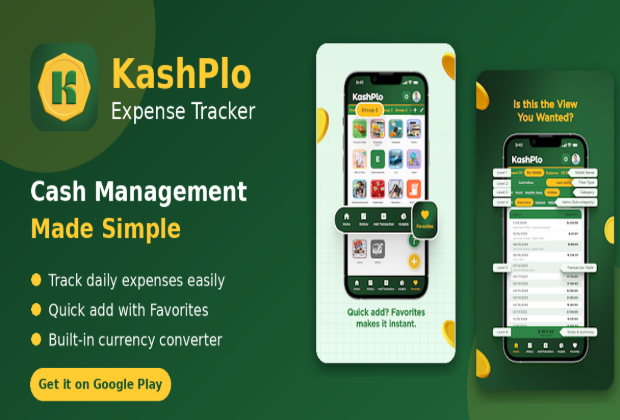
Think about the last time you bought something small, like a snack, a bus ticket or a cup of tea. Now imagine logging it in your expense tracker. How many times did you have to tap your screen?
For many apps, the honest answer is six, seven or more. And that’s the quiet reason so many expense trackers end up forgotten.
The Hidden Cost of Every Tap
A single tap feels like nothing. But expense tracking isn’t a one-time task. It’s something you repeat several times a day, every day.
Here’s what a typical entry looks like in a feature-heavy app:
- Open the app
- Tap the “Add” button
- Choose expense or income
- Select a category
- Select an account or wallet
- Enter the amount
- Add a note or date
- Tap save
That’s eight steps for one small purchase. Multiply it by four or five purchases a day, and you’re spending a real chunk of your time just recording what you spent.
Nobody decides to quit tracking. It happens because the effort slowly outweighs the reward. One skipped entry becomes a skipped day, and then a skipped week.
Where Complexity Creeps In
Many budgeting apps try to do everything: investment tracking, bank syncing, reports, goals, reminders. Each feature adds a new button, tab or menu. The result is an app that is powerful on paper but tiring in practice.
For people who just want to know where their daily money goes, most of that is noise. What they need is a fast, simple way to record spending and a clear way to see it.
The KashPlo Approach: Count Fewer Taps
KashPlo was designed around a simple question: how few steps can it take to record an everyday expense? Its answer is built on four ideas.
Saved Favorites Remove the Repetition
We spend on the same things again and again: groceries, tea, fuel, lunch, rent. KashPlo lets you save these as Favorites, each with its wallet, category and item already set.
To record one, you:
- Tap the Favorite.
- Type the amount.
- Save.
That’s roughly three steps, and it takes about 4 seconds. Compare that with the eight steps above. The details you’d normally pick every time are already there.
A Table-Style Home Screen You Can Read at a Glance
Many apps greet you with graphs, banners and cards. KashPlo’s home screen is a simple, table-style list of your transactions, similar to a paper ledger.
You don’t need to interpret a chart to answer “What did I spend today?” The information is right there in rows, which also means fewer taps to check or confirm anything.
A Clean Interface That Stays Out of Your Way
KashPlo is intentionally basic. There are fewer buttons, fewer competing elements and fewer distractions. When you open it, you can see what to do next without thinking.
A cleaner screen also lowers the small mental effort of opening the app, which makes you more likely to open it at all.
Direct Access to What Matters
The essential features, adding an expense, viewing transactions and checking your spending, are placed where you can reach them directly. You don’t have to remember which menu hides which option.
Tap Count: A Quick Comparison
| Task | Typical feature-heavy app | KashPlo with Favorites |
| Record a repeat expense | About 7 to 8 steps | About 3 steps |
| Check today’s spending | Open app, find reports or dashboard | Open app, view the home screen |
| Time per entry | Often 20 to 30 seconds | About 4 seconds |
These figures are illustrative and vary by app and by how you use it. KashPlo’s roughly 4 seconds applies to saved Favorites.
Simple on the Surface, Capable Underneath
Simplicity doesn’t mean KashPlo can’t handle more. When you need it, the app also offers:
- Multiple wallets and categories to organize spending your way.
- A Monthly Tasks checklist to track which recurring bills are paid and which are due.
- A budget dashboard with spending charts for a bigger-picture view.
- Travel expense tracking with currency conversion.
These sit in the background. They don’t crowd the everyday experience of logging a quick expense.
Is KashPlo Right for You?
KashPlo suits you if you:
- Have given up on an expense tracker because it felt like too much work.
- Mostly want a quick, reliable record of daily spending.
- Prefer a clean app over one packed with options.
- Are starting a tracking habit and want the easiest possible way in.
If you love detailed financial analysis and automatic bank syncing, a more complex tool may suit you better. But if your goal is to track consistently without the hassle, simple is the way to go.
Final Thoughts
Tracking your expenses only helps if you keep doing it, and people keep doing what’s easy. By cutting unnecessary taps, saving your frequent transactions as Favorites and keeping the interface clean, KashPlo turns tracking from a chore into a few-second habit.
Ready to try it? KashPlo is available on the App Store for iPhone and iPad, and on Google Play for Android. It’s free to download, with optional in-app subscriptions.

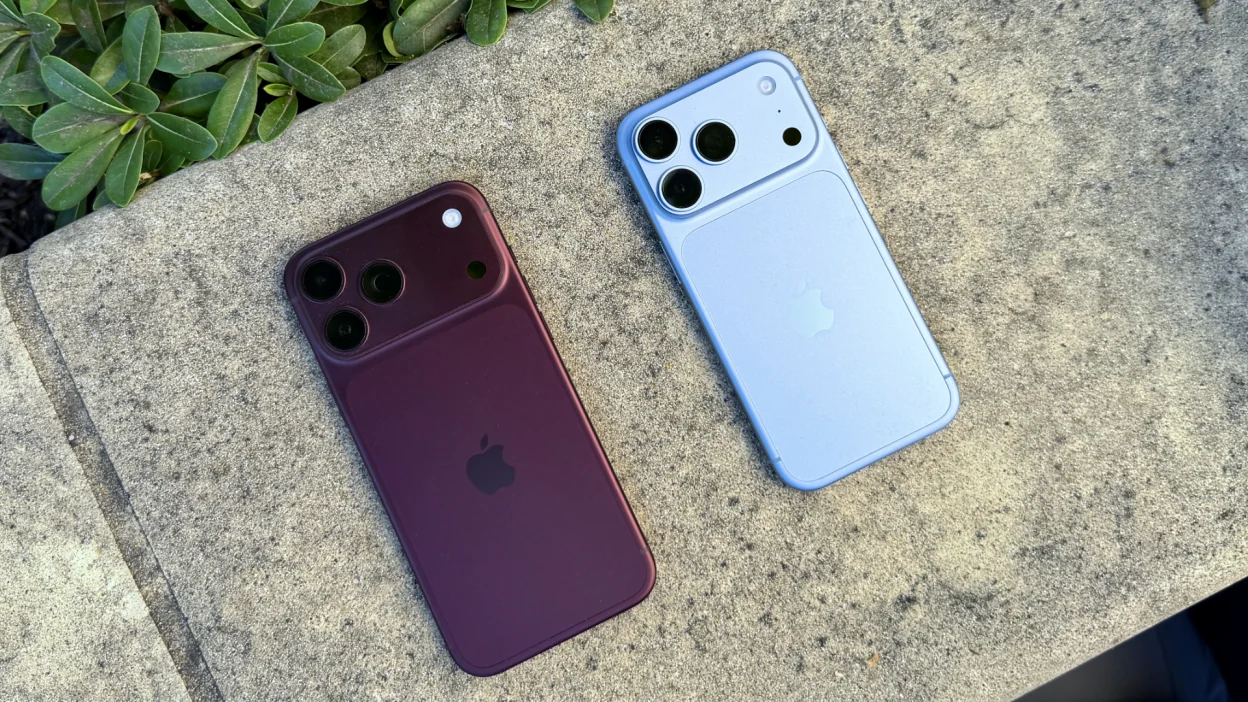
Migration day is supposed to feel like Christmas. Lid off the box, new iPhone 18 in your palm, tap through setup, watch the little progress circle promise that everything is coming with you.
Except for a lot of people this fall, it didn’t.
Scroll the forums and the complaints repeat in an eerie loop. Photo libraries missing whole years. WhatsApp histories that didn’t make the jump. Notes folders half-empty. And in a parallel wave, people who never bought a new phone at all — they just updated an older iPhone to iOS 27, and now it’s frozen on the Apple logo, taunting them.
Apple hasn’t called it a bug, and honestly, most of it isn’t one. But that doesn’t make your missing photos any less missing. Here’s what’s actually going on, and what works.
Two different problems wearing the same costume
First, the migration stuff. Quick Start is genuinely good at moving the obvious things: contacts, messages, most app data. It’s worse at the invisible stuff. Media cached under “System Data,” some third-party app databases, and files sitting in app-specific sandboxes don’t always hop across the wireless transfer. And in a surprising number of forum threads, the “lost” photos were never lost at all — they were still sitting on the old device, which the owner had already wiped, traded in, or handed to a kid.
Second, the update stuff. iOS 27 is a big install. Phones with nearly full storage, flaky Wi-Fi, or aging batteries fail mid-write more often than you’d think. A failed write doesn’t always brick the phone, but it can leave the operating system unable to boot: recovery mode, boot loops, the endless logo.
Different causes. Same panic. And the fixes are nothing alike.
Why “just restore from backup” makes it worse
The reflexive advice — restore from iCloud — is a blunt instrument. A restore rolls the whole phone back to the moment the backup was taken. Do that on a brand-new iPhone 18, and you’ll undo weeks of new messages, new photos, new everything, just to get back one folder of old notes.
Worse, plenty of people discover mid-restore that their only backup is months stale, or encrypted with a password nobody wrote down.
What actually works, in the right order
Start boring. Keep the old phone. Charged, switched on, in a drawer. Do not wipe it until you’ve confirmed every last photo made the jump, because in half these stories the old phone is the rescue.
Then check the dumb stuff: Recently Deleted, app-level trash bins, and whether iCloud Photos got toggled off during setup. You’d be amazed how many “migration disasters” turned out to be a settings switch.
If the data truly isn’t on the new device, go surgical instead of nuclear. Desktop suites like the Stellar Toolkit for iPhone can read your old local iTunes or Finder backups — including encrypted ones — and let you pull out just the missing album or chat history without touching the new phone’s current state. The current build already supports iOS 27 and the iPhone 18 line, which matters more than it sounds. Plenty of older recovery tools simply can’t parse the new backup format yet.
For the frozen-phone crowd, skip the DFU restore on your first attempt. A system-level repair that rebuilds the corrupted OS files around your data beats a wipe-and-pray restore every time. The same suite includes a module to repair a boot-looped iPhone without wiping it, and it’s one of the few routes that keeps your data intact while the phone learns to start again.
And to be fair to Apple: if the device is under warranty and physically misbehaving — overheating, battery swelling, storage failing — Genius Bar first. Software can’t fix solder.
The boring checklist nobody follows
Free up storage before updating. A phone at 99% capacity is how most iOS 27 boot loops get born. Make a fresh encrypted local backup and write the password on actual paper. Update your apps before the OS, not after. And if your phone is your livelihood, sit on .0 releases for a week or two while the early adopters find the gremlins for you.
Questions people are asking right now
Are my photos gone forever after the iPhone 18 transfer?
Probably not. In most cases, they’re still on the old device, in an old local backup, or hidden behind an iCloud Photos toggle that got switched off during setup. Check all three before mourning anything.
Can a phone stuck on the Apple logo after iOS 27 be saved?
Usually, yes. The storage is typically fine. It’s the operating system that’s confused. A system-repair pass that replaces only the corrupted OS files will bring most of these phones back with user data untouched. DFU restore works too, but it empties the device first.
Does recovery software even work on iPhone 18 and iOS 27 yet?
Some does, some doesn’t. New hardware and new backup formats break older tools until vendors ship updates, so check the compatibility list before buying anything. Stellar’s iPhone toolkit shipped iOS 27 support alongside the launch, which is why it keeps coming up in these threads.
Will iOS 27 slow down my older iPhone?
Marginally, in some cases, and usually only for the first few days while indexing runs in the background. If it’s still sluggish after a week, the culprit is more often storage pressure than the OS itself.
Should I update to iOS 27 right now?
If the phone is your only camera, bank key, and work device? Give it a fortnight. Security patches matter, but so does not being the person debugging a .0 release on a Tuesday night.
The last word
Every major iPhone launch produces the same story: new hardware, new OS, and a thousand people convinced their digital life evaporated overnight. It almost never evaporated. It’s misplaced, half-migrated, or locked inside a backup nobody can open. Stay calm, keep the old device alive, and work the problem in the right order. That’s the whole trick.
Technology
The Rise of AI Macro Dramas: How Solo Creators Are Producing Binge-Worthy Cinematic Series at Home


We are living in the undisputed golden age of the binge-watch. From sweeping fantasy epics to gritty sci-fi dystopias, our appetite for deep, narrative-driven content is insatiable. For decades, the power to create these sagas was locked behind the towering gates of Hollywood studios, requiring millions of dollars, massive crews, and months of grueling production. If you had a brilliant idea for a complex, multi-season drama, it usually stayed exactly where it started: in your head.
But the entertainment landscape is experiencing a seismic shift. We are witnessing the birth of a entirely new genre of digital storytelling: the AI Macro Drama. Thanks to rapid advancements in generative artificial intelligence, solo creators—writers, dreamers, and cinephiles—are bypassing traditional production bottlenecks entirely. They are sitting in their bedrooms and directing cinematic, binge-worthy series using nothing but their imagination and an internet connection.
This is no longer about generating a quirky three-second clip of a cat riding a skateboard. This is about real storytelling. This is about constructing rich worlds, developing complex characters, and stringing together episodic narratives that keep viewers hitting “Next Episode.”
What Exactly is an AI Macro Drama?
To understand the AI Macro Drama, we first have to look at the evolution of AI video. In its infancy, generative video was a novelty. It was plagued by inconsistencies, bizarre morphing, and an inability to maintain a coherent visual style for more than a few seconds. You could generate a beautiful still image, but the moment you tried to animate it, the illusion shattered.
An AI Macro Drama represents the maturation of this technology. It is a long-form or episodic narrative created primarily through AI generation, characterized by consistent character identities, distinct cinematic direction, and a structured plot. These aren’t just random visuals stitched together with an AI voiceover; they are intentional, scripted, and meticulously directed pieces of cinema.
Creators are treating these projects like actual TV shows. They are writing pilot scripts, creating storyboards, and dropping episodic releases on platforms like YouTube and TikTok. For fans of deep lore and expansive universes, AI Macro Dramas offer a new frontier of content to consume. When one creator’s imagination isn’t limited by budget constraints, the stories they can tell are boundless. We are seeing independent creators produce cyberpunk thrillers, historical dramas, and mind-bending sci-fi series that rival the conceptual ambition of major streaming networks.

Breaking Down the Traditional Filmmaking Barriers
Why is this happening now? Because the traditional barriers to entry in filmmaking have always been brutally high.
Consider what it takes to shoot a standard dialogue scene in a traditional indie film. You need to cast actors, secure a location, hire a camera crew, arrange lighting, manage audio, and then spend weeks in post-production color grading and editing. If your script calls for an explosion, a futuristic cityscape, or a period-accurate costume, your budget immediately skyrockets.
For the average storyteller, these logistical nightmares often mean compromising their vision. The sprawling sci-fi epic gets rewritten into a “two people talking in a diner” indie flick just to get made.
AI generation eliminates these physical and financial constraints. The creator assumes the role of the ultimate auteur: writer, director, cinematographer, and casting director, all rolled into one. The “set” is virtual, the “actors” are generated, and the lighting is dictated by algorithms rather than heavy equipment.
The Next Generation of Text-to-Video Technology
The engine driving this revolution is the incredible leap in text-to-video capabilities. Just a year ago, generating video from text required complex coding knowledge and a massive amount of computational power. Today, the process has been streamlined into intuitive, user-friendly interfaces that prioritize the creator’s vision over technical hurdles.
Instead of setting up physical cameras, modern creators direct their films using highly specific prompts. They dictate camera angles (e.g., “low angle, wide shot”), lighting conditions (e.g., “cinematic lighting, neon rim light, volumetric fog”), and character actions.
This democratization of cinema is largely fueled by advanced AI-powered filmmaking platforms like APOB.ai, which have transformed the complex process of video generation into an accessible, browser-based workflow. For solo creators, having a centralized platform where they can type a script and watch it materialize into dynamic video is the equivalent of handing them the keys to a virtual Hollywood backlot.
The focus has shifted from how to make the video to what the video should be about. Storytelling is taking center stage once again.

Directing High-Fidelity Scenes: The Cinematic Edge
Of course, if a creator wants an audience to binge-watch a five-part AI Macro Drama, the visual quality has to be impeccable. Audiences are trained to recognize the visual language of high-end cinema—the depth of field, the texture of film grain, the realistic physics of movement.
This is where the underlying AI models make all the difference. To achieve true cinematic immersion, creators are relying on heavy-duty rendering models. For example, utilizing the Ultra S model (driven by the robust Seedance 2.5 architecture) allows directors to push past the “uncanny valley” and generate high-fidelity footage.
When generating scenes with these advanced models, the difference is night and day. Skin textures look porous and real, clothing fabrics move naturally with the character’s gait, and lighting bounces accurately off different surfaces. This level of photorealism is essential for Macro Dramas because it allows the audience to forget they are watching an AI-generated piece and simply get lost in the saga.
Solving the Multi-Character Dilemma: The Key to True Drama
While beautiful visuals are important, the beating heart of any drama—whether it’s a soap opera or an HBO thriller—is human interaction. It’s the tension between two people in a room. It’s dialogue, conflict, and chemistry.
Historically, this has been the Achilles’ heel of AI video generation. AI models are notoriously bad at handling multiple subjects in a single frame. If you asked early AI to generate “a man and a woman arguing at a table,” you would often get a horrifying amalgamation of limbs, blending faces, and distorted backgrounds. The AI simply couldn’t keep track of who was who.
To produce a compelling AI Macro Drama, creators absolutely must be able to direct multi-character scenes. You cannot tell a compelling story if your characters can never share the same screen.
Thankfully, the technology has finally caught up to the narrative demands of creators. Modern tools have introduced precise control mechanisms to ensure spatial consistency. A major breakthrough for indie directors is creating multi-character scenes via APOB’s Add Element feature.
By allowing creators to specifically isolate and add new elements or additional characters into a generated environment, the AI is forced to understand the spatial relationship between subjects. A director can now generate a stunning background, place their protagonist in the frame, and subsequently “add” an antagonist stepping out of the shadows, all without the video warping into a glitchy mess.
This capability unlocks the true potential of the Macro Drama. It allows for over-the-shoulder dialogue shots, complex action sequences, and the subtle, unspoken reactions between characters that define great television. It elevates the medium from “moving pictures” to actual acting and directing.
The Future of the Binge-Watch
As these tools become faster, cheaper, and even more intuitive, we are going to see a flood of new cinematic voices. The next great saga might not come from a writers’ room in Los Angeles; it might be produced by a teenager in a small town who finally has the tools to bring their universe to life.
We are entering an era where the only limit to cinematic creation is the depth of the creator’s imagination. As viewers, we should be thrilled. The streaming queues of tomorrow won’t just be filled with studio greenlights; they will be populated by wildly original, visually stunning AI Macro Dramas born from the minds of independent visionaries.
For anyone who has ever watched a movie and thought, “I have a better story to tell,” the wait is over. The studio is open, the camera is ready, and it only takes a few keystrokes to call “Action.”

Where to Buy Indian Grocery Essentials for Thanksgiving Dinner in the USA

How to Scope an AI MVP That Users and Investors Take Seriously

Inside a China Eyewear Factory: How Eyewear Goes from Design and Material Selection to Mass Production

Alex Pettyfer Net Worth, Wife, Age, Height, Children, Career and More

Brad Williams Net Worth, Wife, Height, Age, Daughter, Family, Career and More

Eldorado.gg Review 2026: How It Works, Safety, Fees, and Risks
-
Celebrity11 months ago
Alex Pettyfer Net Worth, Wife, Age, Height, Children, Career and More
-
Celebrity11 months ago
Brad Williams Net Worth, Wife, Height, Age, Daughter, Family, Career and More
-
Blog3 months ago
Eldorado.gg Review 2026: How It Works, Safety, Fees, and Risks
-
 Anime12 months ago
Sanzoku Bandits of One Piece: Origins, Higuma, and Their Role in Dawn Island
-
 Celebrity11 months ago
John McGinn Net Worth, Age, Height, Wife, Childrens, Career and More
-
 Celebrity11 months ago
Frances de la Tour Net Worth, Age, Height, Husband, Childrens, Career and More
-
 Anime12 months ago
Shimotsuki Ushimaru – The Last Daimyo of Wano Country Explained
-
 Celebrity12 months ago
Will Trickett Net Worth, Wife, Childrens, Age, Career and More